
 by
by Have you ever wondered how the internet gets to your computer, tablet, or phone when you use a cable instead of WiFi? Behind the scenes, there are special tools that help everything work smoothly. Two of the most important tools are called patch panels and network switches. Today, we’re going to learn about patch panel vs network switch, and I promise to explain everything so simply that even a young child could understand it. Think of this as a fun journey into the world of cables and connections, where we’ll discover what these mysterious boxes do and why they’re both important for getting you online. By the end of this article, you’ll know exactly what each one does and why people use them in homes, schools, and offices everywhere.
What Is a Patch Panel?
Let’s start with the patch panel, which is actually the simpler of the two devices we’re comparing in our patch panel vs network switch discussion. Imagine you have a big toy box with lots of different toys inside, but everything is messy and tangled up. Now imagine you get a special organizer with lots of little slots where each toy has its own special place. That’s basically what a patch panel does, but instead of toys, it organizes cables. A patch panel is like a big board with many small holes or ports on the front, and behind each port is a wire that connects to somewhere else in your building. It doesn’t have any buttons, lights, or complicated electronics inside – it’s just a really smart way to keep all your network cables organized in one place. When someone installs cables in the walls of a building, all those cables come to the patch panel so everything stays neat and tidy instead of being a giant mess of wires everywhere.
The patch panel sits quietly in a special cabinet or rack, and it doesn’t need to be plugged into electricity because it doesn’t actually do any thinking or work with the data. It’s what we call a “passive” device, which means it just sits there and lets the signals pass through it without changing anything. Think of it like a really organized parking lot for cables – each cable knows exactly where to park, and you can easily find any cable you need. The front of a patch panel usually has numbers or labels next to each port so people know which cable goes where. If you’ve ever seen a telephone switchboard from old movies where operators would plug cables into different holes to connect phone calls, a patch panel works on a similar idea, except everything is already connected and you don’t need to move cables around very often. This simple but clever design makes it super easy for people who work with networks to find problems and fix them quickly.
What Is a Network Switch?
Now let’s talk about the network switch, which is definitely more exciting and complicated when we compare patch panel vs network switch. A network switch is like a really smart traffic controller for your internet data. Imagine you’re at a busy intersection where lots of cars are coming from different directions, and there’s a police officer directing traffic, telling each car exactly where to go so nobody crashes into each other. That’s what a network switch does with data! When you have many computers, printers, game consoles, and other devices all trying to use the internet at the same time, the network switch makes sure that the information going to your computer doesn’t accidentally go to someone else’s printer. It’s an active device, which means it has special computer chips inside that actually think and make decisions about where to send data. Unlike the patch panel that just organizes cables, the network switch actually looks at the data coming through it and figures out the best path to send it.
A network switch needs to be plugged into electricity to work because it has all those smart electronic parts inside that need power. You’ll see lots of little lights on the front of a network switch, and these lights blink and flash to show you that data is moving through the device. Some switches are small with just a few ports (maybe 5 or 8), which are perfect for homes, while others are really big with 48 or even more ports for large offices where hundreds of people need to connect to the network. The switch learns which devices are connected to which ports, and it remembers this information so it can send data super fast. When your computer wants to send a file to your friend’s computer, the switch knows exactly which port your friend’s computer is plugged into and sends the data straight there without bothering any other devices. This makes everything faster and more efficient than if all the data just went everywhere at once.
The Big Difference: Patch Panel vs Network Switch
When we really look at patch panel vs network switch, the biggest difference is actually quite simple once you understand it. The patch panel is like a very organized closet or drawer where you keep things neat and labeled, but the closet itself doesn’t do anything except hold things in place. The network switch, on the other hand, is like a smart robot that actively does work by directing traffic and making decisions. If you took away the patch panel from a network, things would work but they’d be messy and hard to manage – like having all your clothes thrown on the floor instead of hung up nicely in a closet. But if you took away the network switch, nothing would work at all because there’d be no traffic controller to send data where it needs to go. Another way to think about it is that the patch panel is about organization and the physical connections, while the network switch is about intelligence and managing the data that flows through those connections.
The patch panel doesn’t need electricity, doesn’t have any lights, and doesn’t make any decisions – it just provides a clean, organized place for cables to connect. The network switch absolutely needs electricity, has lots of blinking lights, and is constantly making thousands of decisions every second about where to send data. In terms of cost, patch panels are usually much cheaper than network switches because they’re much simpler devices with no electronic components that need to think. You might pay maybe twenty to fifty dollars for a decent patch panel, but a good network switch can cost anywhere from fifty dollars for a simple home model to thousands of dollars for professional switches used in big companies. Both devices have multiple ports that look similar from the outside, but what happens inside these devices is completely different, and that’s the key to understanding patch panel vs network switch.
How They Work Together
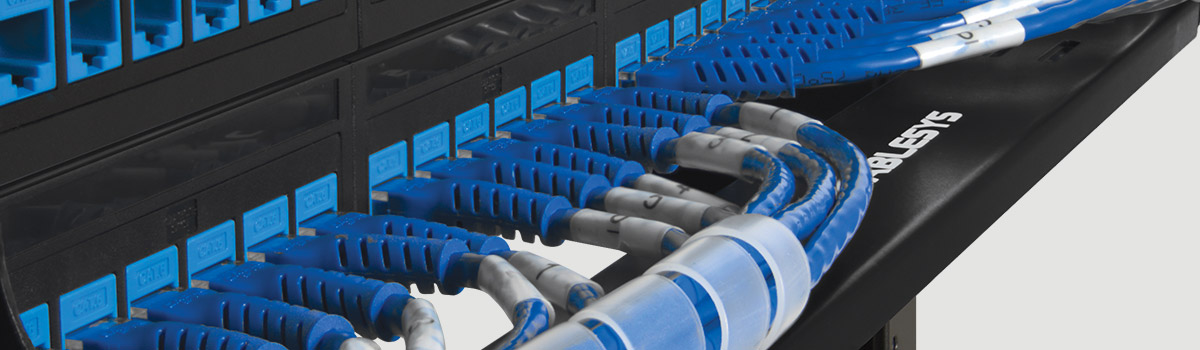
Here’s where things get really interesting in our patch panel vs network switch comparison – these two devices actually work together as a team! In most professional network setups, you’ll find both a patch panel and a network switch sitting near each other, usually in the same rack or cabinet. Here’s how they work together: First, cables run through the walls and ceilings of a building, and all these cables plug into the back of the patch panel. Then, someone uses short cables (called patch cables) to connect the front of the patch panel to the ports on the network switch. Finally, the network switch connects to the internet router or to other switches in the building. This setup creates a beautiful system where the patch panel keeps all the permanent cables organized, and the network switch does all the smart work of moving data around.
Imagine a restaurant kitchen where you have a shelf with all your ingredients organized nicely (that’s like the patch panel), and then you have a chef who takes ingredients from the shelf and cooks them into delicious meals (that’s like the network switch). Both are necessary for the restaurant to work well – you need the organization and you need someone to actually do the cooking. In a network, the patch panel organizes where all the cable connections are, making it easy to see what’s connected to what, and making it simple to move things around if needed. The network switch then takes all those organized connections and does the actual work of sending internet data to the right places. When a network technician needs to troubleshoot a problem or change how the network is set up, they can simply unplug a cable from the patch panel and plug it into a different spot on the switch, without having to pull cables out of walls or make any big changes to the building.
When Do You Need a Patch Panel?
You might be wondering whether you need a patch panel for your own network setup. The answer depends on how big and complicated your network is. If you just have a few devices at home – like maybe a computer, a gaming console, and a smart TV – you probably don’t need a patch panel. You can just plug those devices directly into your network switch or router, and everything will work just fine. However, if you have a bigger home with network cables running through the walls to different rooms, or if you’re setting up a network for an office, school, or any business, then a patch panel becomes really helpful. The patch panel shines when you have many cables that are permanently installed in walls and you want to keep everything organized and professional-looking. It’s especially useful when you have network cables coming from different floors of a building or from many different rooms all converging in one place.
Without a patch panel, you’d have dozens or even hundreds of cables just hanging loose, and it would be incredibly difficult to figure out which cable goes where when something needs to be fixed or changed. The patch panel also protects your network switch from getting damaged. Think about it this way – the cables in your walls are permanent and hard to replace, so you don’t want to be constantly unplugging and plugging them in. Instead, you plug those permanent cables into the patch panel just once, and then you use cheap, easily replaceable patch cables to connect the panel to your switch. If one of those short patch cables breaks, you just replace it with a new one instead of having to rewire your whole building. Professional network installers almost always use patch panels because they make their job so much easier and they make the network look clean and professional. If you open up a network cabinet in a professional building and see a beautiful, organized array of cables, you can bet there’s a good patch panel in there making that organization possible.
When Do You Need a Network Switch?
A network switch is necessary in many more situations than a patch panel. In fact, whenever you have more devices that need to connect to your network than you have ports on your router, you need a network switch. Most home internet routers only have four network ports on the back, so if you have five or more devices that need to be plugged in with cables, you’ll need to add a switch. The network switch expands the number of devices that can connect to your network, and it does this intelligently by managing the traffic between all those devices. Even if you only have a few devices now, getting a network switch is a good investment if you think you’ll be adding more devices in the future. Switches are also necessary when you want to connect devices that are far apart from each other, like in different rooms or different floors of a building.
Businesses absolutely need network switches because they have many computers, printers, phones, servers, and other equipment that all need to be on the network at the same time. Some businesses even have multiple network switches connected together to handle all their devices. Gaming enthusiasts often use network switches in their homes because wired connections through a switch give them faster and more reliable internet speeds than WiFi, which is really important for competitive online gaming. When you’re setting up security cameras around your property, you’ll often use a network switch to connect all the cameras together so you can view them all from one location. The switch makes sure that the video feed from each camera gets to your monitoring system without any confusion or delays. Even in homes with smart home devices, a network switch can be helpful because it provides stable, fast connections for devices like smart thermostats, home automation hubs, and network storage devices that work better with wired connections than with wireless ones.
Understanding the Patch Panel vs Network Switch Decision
When you’re planning a network and trying to decide what equipment you need, the patch panel vs network switch question isn’t really about choosing one or the other – it’s about understanding that they serve completely different purposes. Think of it like asking “Do I need a refrigerator or a stove?” – well, they do different things, and a complete kitchen needs both! A network switch is almost always necessary if you have multiple devices to connect, because it’s the device that actually makes the network function. The switch is the brain that directs traffic and makes sure data gets where it needs to go. A patch panel, on the other hand, is an organizational tool that makes managing your network easier, cleaner, and more professional, but it’s not absolutely required for the network to function.
If you’re setting up a simple home network with just a few devices in one room, you probably only need a network switch and can skip the patch panel entirely. Just plug your devices directly into the switch, and you’re good to go. However, if you’re installing network cables throughout your home in the walls, having a patch panel in a central location (like a closet or basement) makes everything much more organized and easier to manage. For any business or professional installation, you should definitely use both a patch panel and a network switch together. The patch panel will save you countless hours of frustration when you need to trace cables or make changes to the network, and it makes everything look neat and professional. The network switch provides the actual functionality that makes the network work. Together, they create a system that’s both functional and manageable, which is exactly what you want in any network that’s going to be around for years and will need occasional changes and updates.
Price Differences Between Patch Panels and Network Switches
Let’s talk about money, because when you’re setting up a network, you need to know what things cost. In the comparison of patch panel vs network switch, there’s a big difference in price, and it makes sense once you understand why. Patch panels are relatively inexpensive because they’re simple devices with no electronics inside. A typical 24-port patch panel for home or small business use might cost anywhere from twenty to seventy dollars, depending on the quality and brand. Even really high-quality, professional-grade patch panels rarely cost more than a couple hundred dollars, and those are the kind used in large corporate data centers. The patch panel is basically just a metal or plastic frame with ports and some internal wiring, so there’s not much to it that would make it expensive. It’s one of the most affordable parts of setting up a professional network.
Network switches, however, can vary wildly in price because they contain sophisticated electronic components and the price depends on how smart and fast the switch is. A basic home network switch with five or eight ports might cost as little as fifteen to thirty dollars and will work fine for simple needs like connecting a few computers and a printer. Mid-range switches with more ports (like 16 or 24 ports) and better performance usually cost between one hundred and three hundred dollars. Professional-grade switches used in businesses, schools, and data centers can cost anywhere from several hundred dollars to several thousand dollars each because they have advanced features like better security, faster speeds, the ability to be managed remotely, and redundant power supplies so they keep working even if something fails. The most expensive enterprise switches can even cost ten thousand dollars or more! So when budgeting for network equipment, remember that the patch panel is a one-time, relatively small investment in organization, while the network switch is where you’ll spend more money, but it’s also the device that does all the important work.
Installation: Which One Is Easier to Set Up?
If you’re thinking about installing these devices yourself, you might wonder which one is easier – the patch panel or the network switch. In our patch panel vs network switch comparison, the network switch is actually much easier to set up and get working. Setting up a basic network switch is super simple: you just plug it into electricity, connect it to your internet router or modem with a cable, and then plug your devices into the open ports on the switch. That’s it! The switch will automatically start working and managing traffic without you having to configure anything. You literally just plug everything in and it works. Even a person who knows nothing about computers can successfully set up a basic network switch in just a few minutes. The lights on the front of the switch will turn on and start blinking, letting you know that everything is working correctly.
Installing a patch panel, however, is more complicated and usually requires some technical knowledge and special tools. First, you need to run network cables through your walls or ceiling to wherever the patch panel will be located. Then, you need to open up the back of each cable and carefully connect the individual tiny wires inside to the correct spots on the patch panel using a special tool called a punch-down tool. You have to make sure each wire goes to the right place according to standard wiring diagrams, or nothing will work. This process is called “terminating” the cables, and it requires precision, patience, and some practice to do it correctly. Most people hire professional network installers to do this part because it’s easy to make mistakes if you don’t know what you’re doing. Once the patch panel is installed, though, it’s installed forever and you rarely need to touch it again. So while the initial installation of a patch panel is harder, the ongoing use is simple, whereas a network switch is easy to install but might need occasional configuration or updates depending on what type you get.
Lifespan and Reliability
When you invest money in networking equipment, you want to know how long it’s going to last. In the battle of patch panel vs network switch, the patch panel wins for longevity because it has no moving parts and no electronics that can fail. A properly installed patch panel can easily last twenty years or even longer without any problems. Since it’s just a passive device with physical connections and no electronics, there’s very little that can go wrong with it. The metal contacts inside might eventually corrode if they’re exposed to moisture, but in a normal indoor environment, a patch panel will outlive most other computer equipment you own. Some patch panels installed in the 1990s are still working perfectly today! This makes the patch panel an excellent long-term investment because you install it once and then forget about it for decades.
Network switches, on the other hand, have a shorter lifespan because they contain electronic components that can wear out or become obsolete. A typical network switch might last anywhere from five to ten years before it needs to be replaced. The electronics inside generate heat, and over time this heat can cause components to fail. The fans inside switches (which cool the electronics) can wear out and need replacement. Also, technology keeps advancing, so even if your old switch still works, you might want to replace it with a newer, faster model that can handle modern internet speeds and has better features. Some really cheap switches might fail after just a few years, while high-quality switches can last longer than ten years. The good news is that switches have gotten much more reliable over the years, and a decent quality switch will usually give you many years of good service. When a switch does fail, you simply replace it with a new one, but your patch panel stays in place and keeps on working.
Maintenance and Troubleshooting
Let’s talk about what happens when something goes wrong with your network and how patch panel vs network switch affects troubleshooting. Patch panels require almost no maintenance at all. Once they’re installed, you might occasionally need to dust them off to keep the ports clean, but that’s about it. There’s nothing to update, no software to manage, and no settings to adjust. However, if a cable gets disconnected from the patch panel or if a port gets damaged somehow, you might need to re-terminate that cable, which requires the same skills and tools used during installation. Troubleshooting a patch panel usually involves checking that cables are firmly connected and testing whether signals are passing through correctly. Since the patch panel is just a physical connection point, problems are usually straightforward to identify and fix.
Network switches need more attention and maintenance. Depending on what type of switch you have, you might need to update its software (called firmware) occasionally to fix bugs and improve security. You should periodically check the lights on the switch to make sure all ports are working correctly. If a port on the switch stops working, you might need to reset the switch or even replace it if the port is permanently damaged. More advanced switches have settings that you can adjust, like how fast each port operates or which devices can connect to which ports, and these settings might need to be updated as your network changes. When troubleshooting network problems, the switch is often where you’ll spend most of your time because it’s actively managing data, so problems with slow speeds, devices not connecting, or data going to the wrong place are usually related to the switch rather than the patch panel. The good news is that modern switches have diagnostic tools built into them that can help you identify problems and often suggest solutions. You can also read this: The Complete Guide to Thera VR: Virtual Reality That Helps People Feel Better
Conclusion
After exploring everything about patch panel vs network switch, you now understand that these two devices are completely different tools that serve different purposes in a network. The patch panel is your organizational hero, keeping all your cables neat, labeled, and manageable without any electronics or complicated features. It’s the foundation that makes a professional network installation clean and maintainable for years to come. The network switch is your traffic controller and data manager, actively directing information to the right destinations and making sure all your devices can communicate with each other efficiently. It’s the brain of your network that does the actual work of moving data around.
For most home users with just a few devices in one location, a network switch alone is probably all you need, and you can skip the patch panel to save money and simplicity. But if you’re running cables through walls, setting up a larger home network, or installing a network for any kind of business or organization, the combination of a patch panel and a network switch together creates a professional, organized, and efficient system that will serve you well for many years. The patch panel provides the organization and easy management, while the network switch provides the intelligence and functionality. Together, they’re the perfect team for building a network that’s both powerful and easy to maintain. Now you know the real story behind patch panel vs network switch, and you can make smart decisions about what equipment you need for your own networking project!